Ashley Forchelli Photography » San Fernando Valley, California Children and Family Photography

Category Archives: Photography Tips

Lesson Learned #3 – Back yourself up

A major concern of photographers in the digital age is storing and handling of images. Today’s cameras take photos that turn in to huge files on your computer. Hard drives can only handle so much and hard drive failure is a common occurrence. I know this and have been doing a pretty decent job of keeping things backed-up. Pretty decent, like about 75%. Which means I lost 25% of my stuff last week when my hard drive crashed. I use Flickr for online storage, have recently signed up with Dropbox and use external hard drives, the key is taking the time to upload and transfer files. They say it’s not “if” but “when”…so when the time comes will you be prepared?

Thought I lost a whole bunch of my kiddos pics, found them on a memory card!

Pin It

Lesson Learned #2 (Where to print)

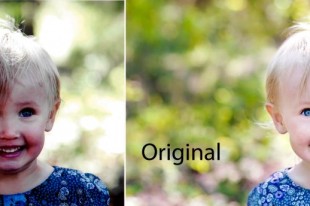
I never realized how important it is to carefully choose where you print your photos. Not all print shops are alike it turns out! Walmart and Costco print for really cheap but is the quality worth the extra cents you are saving? Look at this…

Agck! Super scary, right? Since I don’t use Walmart for prints, I borrowed this image from photographer Mandy Chiappini. She takes such beautiful, vibrant pictures and it would be such a shame to have them turn out dark and muddy like the Walmart version!

I have found two places that are easy to use and affordable but still print high quality.  Try using one of the following for your special prints and see if it makes a difference!

Kodak Pro Matte http://www.kodakgallery.com
MPix http://www.mpix.com

Pin It

Lesson Learned #1 (8×10)

I thought it might be fun to share some photography tips with you as I learn them. There are lots of little tricks that anyone can apply to their photography that will really make a difference.

What I want to show you today is how your pictures are affected when you change the size for print. Your camera will take your pictures in 2×3 format, which means if you print a 4×6, it will look the same as your digital file. However, if you change the size of the print to a 5×7 or an 8×10, you will lose some of your picture.

The top picture below is 4×6 and is right out of camera. The 2nd picture has been converted to 8×10. Do you see how much of the top and bottom is lost? It’s quite a difference.

So when you take pictures that you might want to blow up to 8×10 or bigger, be sure to leave room on the long ends so your subject doesn’t get cut off. You may find that if you hire a professional photographer who gives you digital images that they are not as zoomed in as you would like and this is because a good photographer will leave room for this type of print cropping. This happened to us recently with some holiday photos we had taken. I loved the images on the disk but when I got back the 8×10 print, our feet had been cut off. Lesson learned!

Pin It